BDHQ PRODUCT TOUR
SELF-GUIDED
MANUFACTURING INTELLIGENCE · APPROVALS · QC

A walkthrough of the
real BDHQ workflow.

Screen by screen — following one furniture order from sign-in through the approval chain to shipment, then the inspector's app on the factory floor.

CONTENTS
01
Setup & approvals
Sign-in to the Production Release gate
02
Inspection
Board, conduct, seal & disposition
03
Supporting & reporting
Finish, hardware, COM & reports
04
On the floor
The inspector's native tablet app
THE MODEL IN ONE GLANCE

One SKU. One approval chain. One gate.

Everything in BDHQ hangs off a single unit — the SKU — moving through a fixed, enforced sequence.

THE ATOM ORDER PO-2024-104 SKU 007 · Bar Stool carries its own drawings, materials, requirements & inspections atom = SKU × stage
01
Drawing Review
Approve the source drawing
02
Product Definition
Structure, materials, checklist
03
Requirements
Customer conditions
◆ GATE
Production Release
The single certification
04
QC Inspections
Conduct the generated checklist
05
Shipment Readiness
Derived clearance to ship
SUPPORTING DOMAINS run alongside the chain — gating only where the product requires it
Finish · gates if required Hardware · independent COM · never a gate
◆ THE ATOM
Every drawing, material, requirement and inspection attaches to a SKU × stage.
◆ THE GATE
No Production Release, no inspection and no shipment. It's server-enforced.
◆ DERIVED
Queues, risk and readiness are computed from real state — never hand-kept.
01

Setup & approvals

Sign in, find the order, open a SKU, and clear the five upstream steps that lead to the Production Release gate.

LoginHomeOrdersOrderSKU Work CenterDrawing ReviewProduct DefinitionRequirementsProduction Release
SETUP & APPROVALS
00

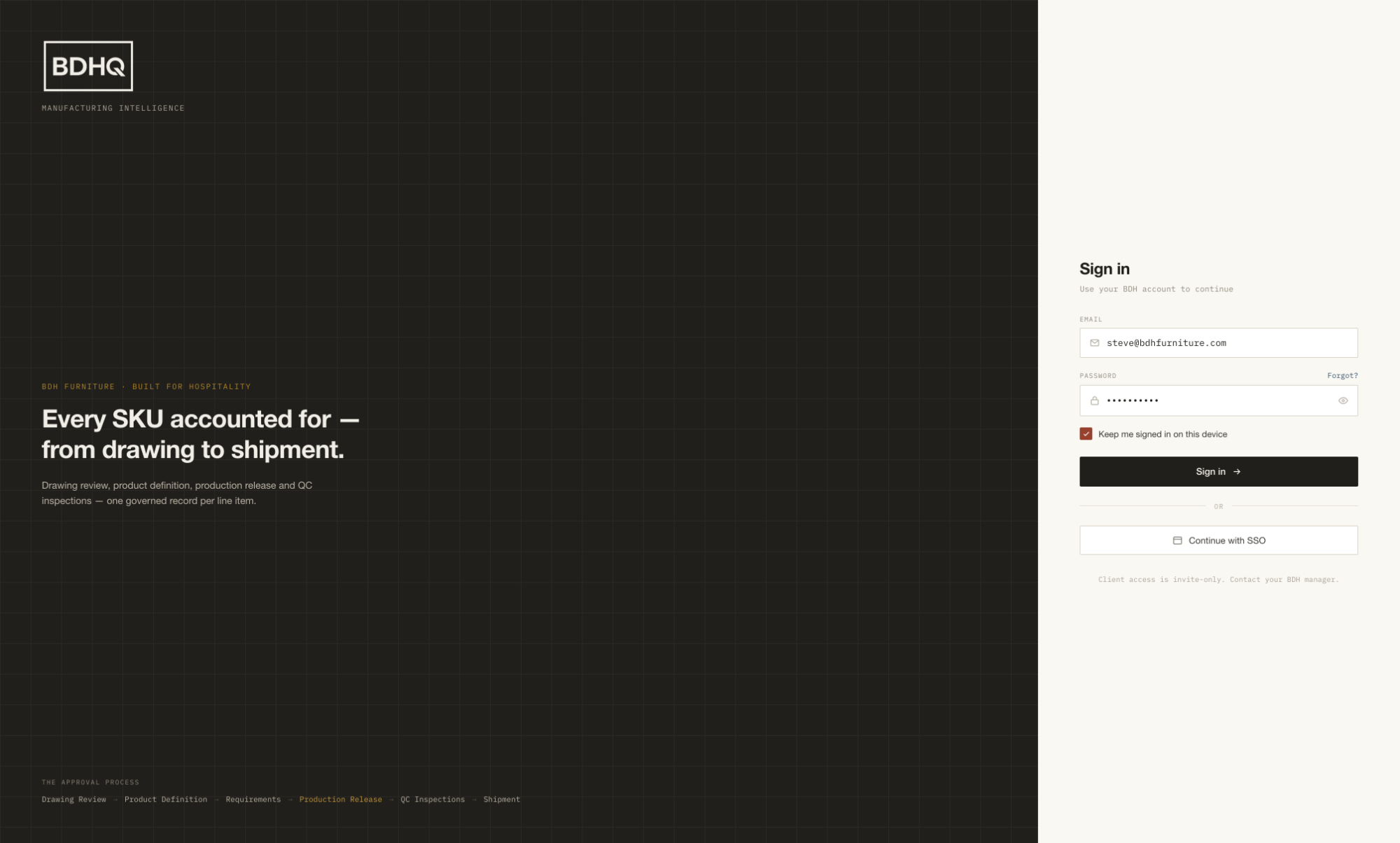
Sign in

One entry point for everyone. Credentials resolve to the right role and the right scope automatically.
ENFORCESALL ROLES
Role and locale are resolved at sign-in.
Role-based experience
Manager, inspector and client each land in a tailored app.
Per-user locale
Opens in English or Vietnamese by the user's setting.
Scoped access
Clients see only their own orders — invite-only visibility.
bdhq.app/login
BDHQ sign-in
SETUP & APPROVALS
01

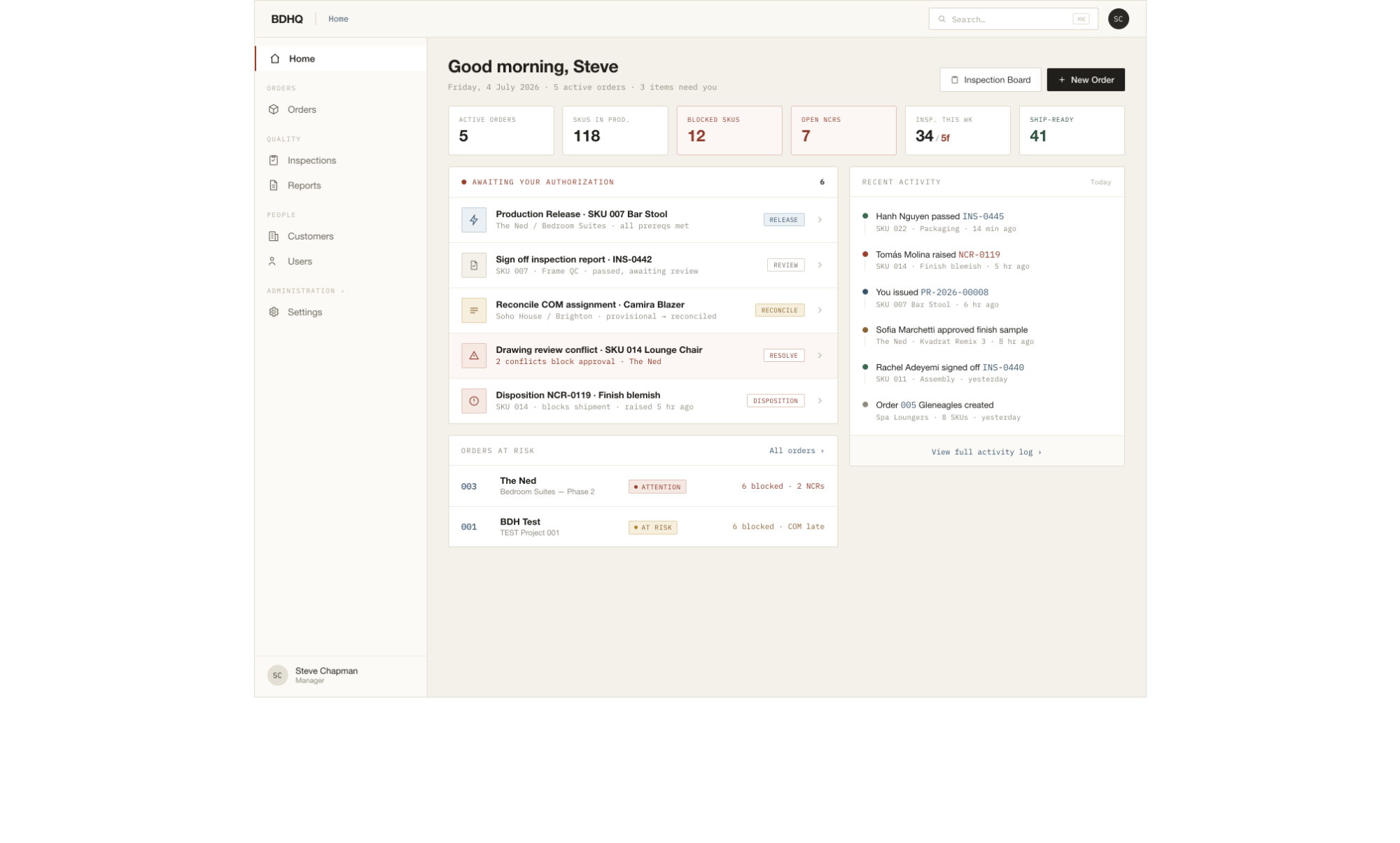
Home — the cockpit

A manager's morning view: what needs a decision, and which orders are drifting.
ENFORCESMANAGER
Every figure is derived from live SKU state.
Awaiting your authorization
A derived action queue — release, sign-off, reconcile, disposition.
Live metrics
Blocked SKUs, open NCRs and ship-ready counts, computed on the fly.
Orders at risk
Attention and At-Risk states surface before they become fires.
bdhq.app/home
BDHQ home dashboard
SETUP & APPROVALS
02

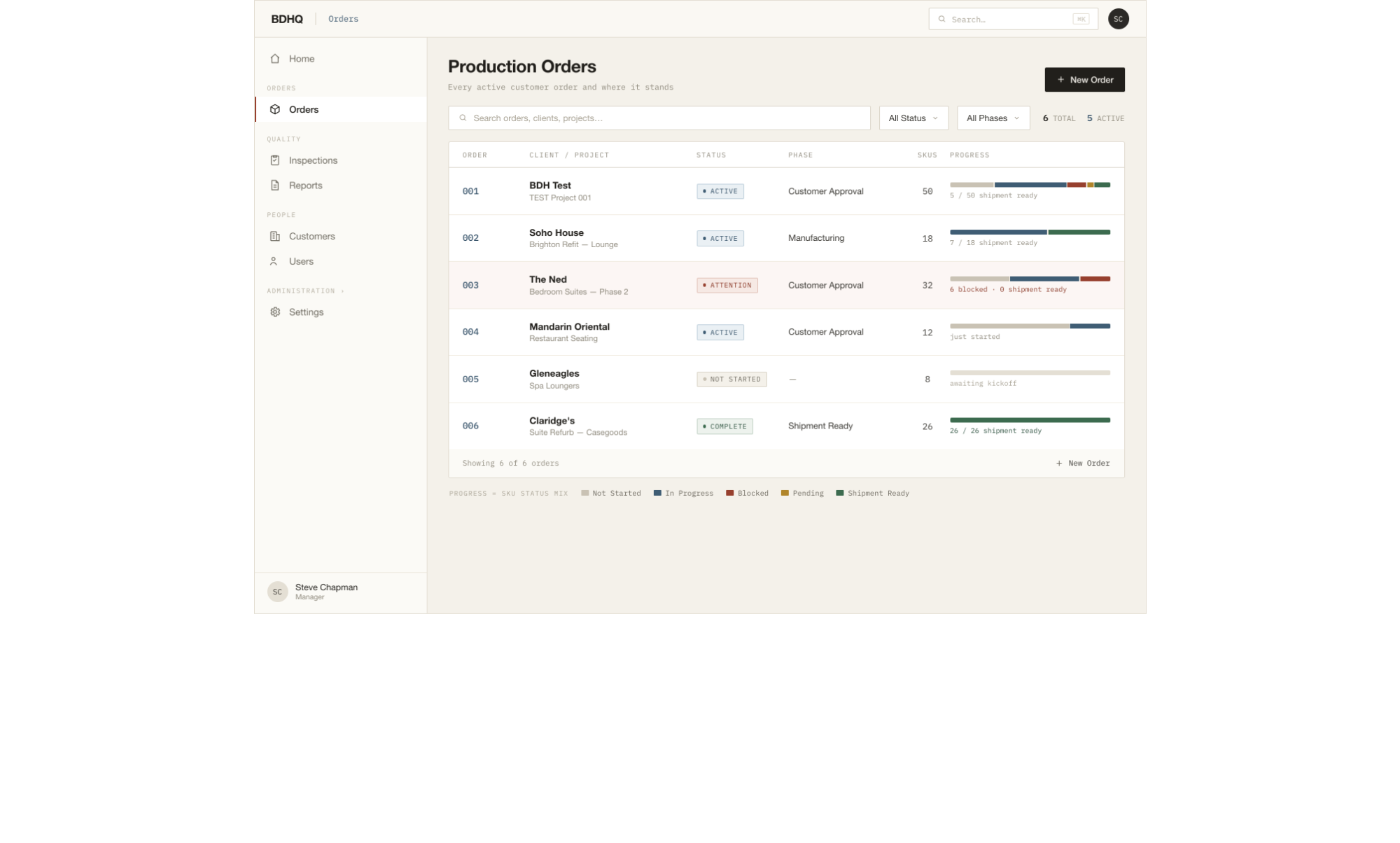
Orders

The top level of the drill-down — and the only screen that shows the global menu.
ENFORCESMANAGER
The global menu appears only at the top level.
Portfolio at a glance
Every active order with its client, SKU count and health.
Rolled-up risk
Blocked and at-risk counts aggregate from the SKUs beneath.
One click in
Opening an order swaps the rail to its order-scoped context.
bdhq.app/orders
BDHQ orders list
SETUP & APPROVALS
03

Order overview

The order's home: its SKUs, its people, and the launch points for its supporting work.
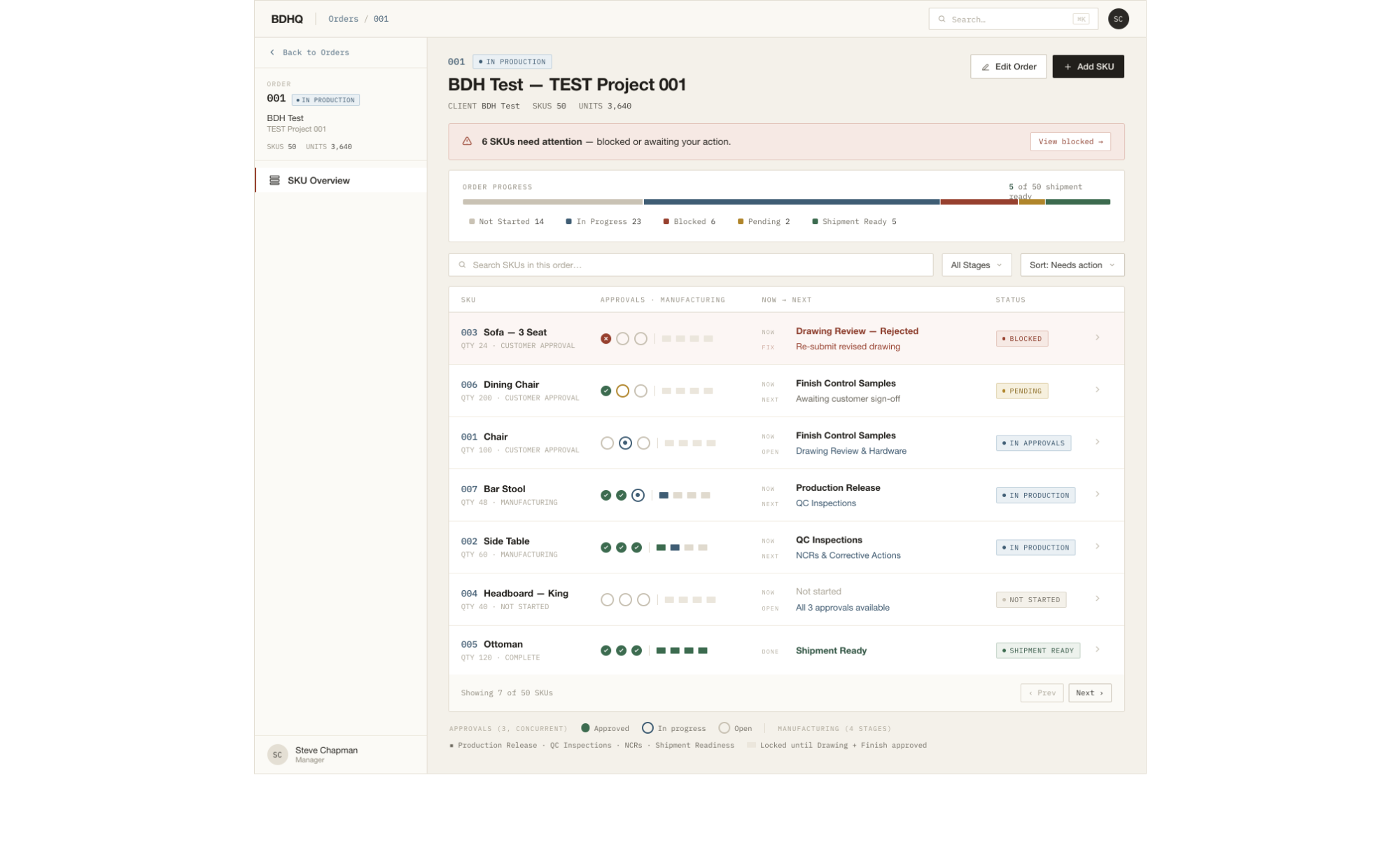
ENFORCESMANAGER
The COM materials library is order-level and ungated.
The SKU list
Each line item with its stage progress and status.
COM materials library
Customer fabrics entered once per order, ungated.
Back-anchored rail
The rail is order-scoped now, with a clear way back up.
bdhq.app/orders/104
BDHQ order overview
SETUP & APPROVALS · THE HUB
04

SKU Work Center

The heart of BDHQ. The rail on the left is this SKU's approval chain.
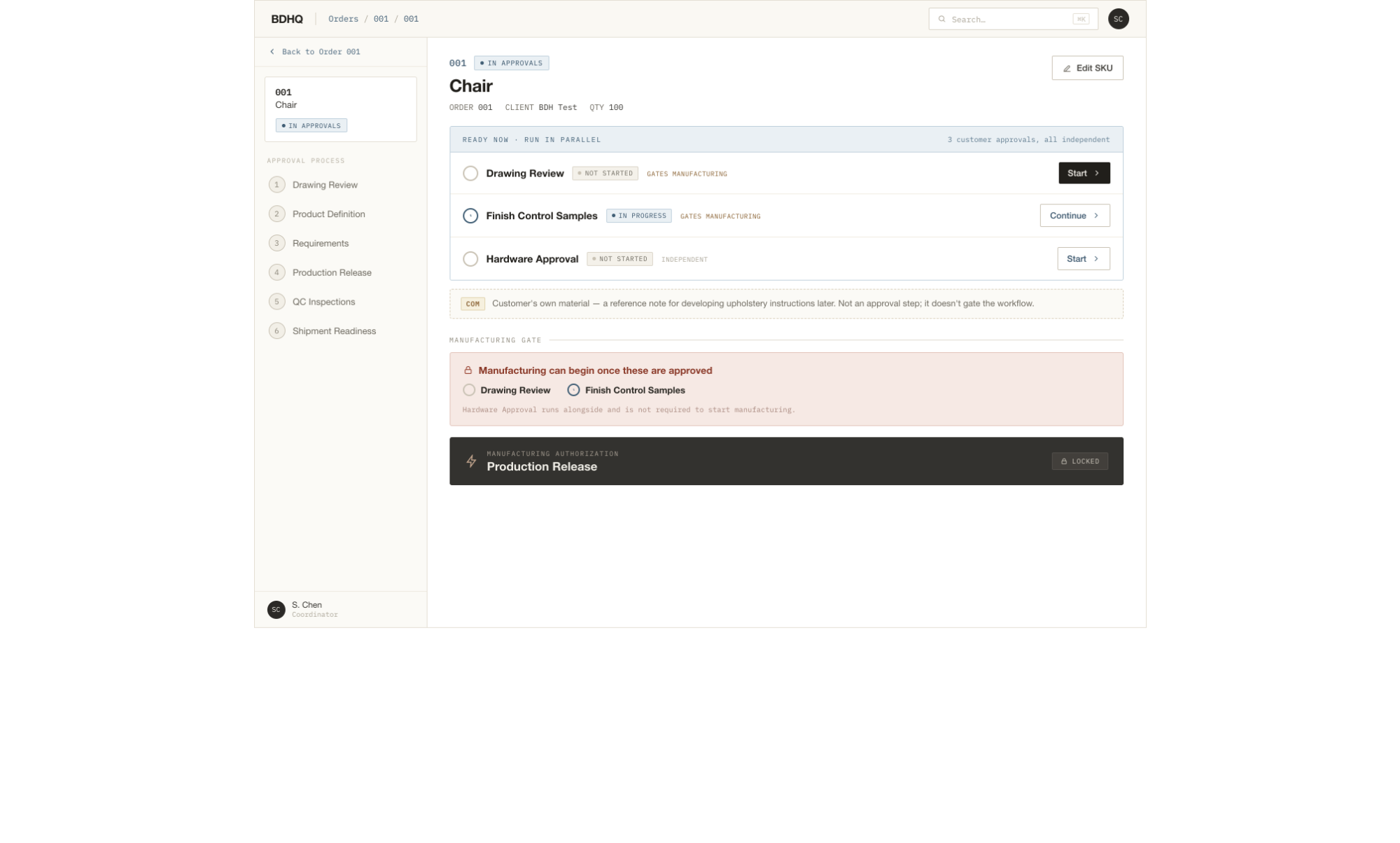
ENFORCESMANAGER
The rail clears each step strictly in order.
The rail is the lifecycle
Six steps, in order — each one gates the next.
Supporting domains launch here
Finish, Hardware and COM open from the overview.
Always oriented
Breadcrumb plus an identity block on every screen.
bdhq.app/orders/104/007
BDHQ SKU Work Center
CHAIN · STEP 01
05

Drawing Review

Read the drawing, pin the intent — the first approval, and the hardest engineering.
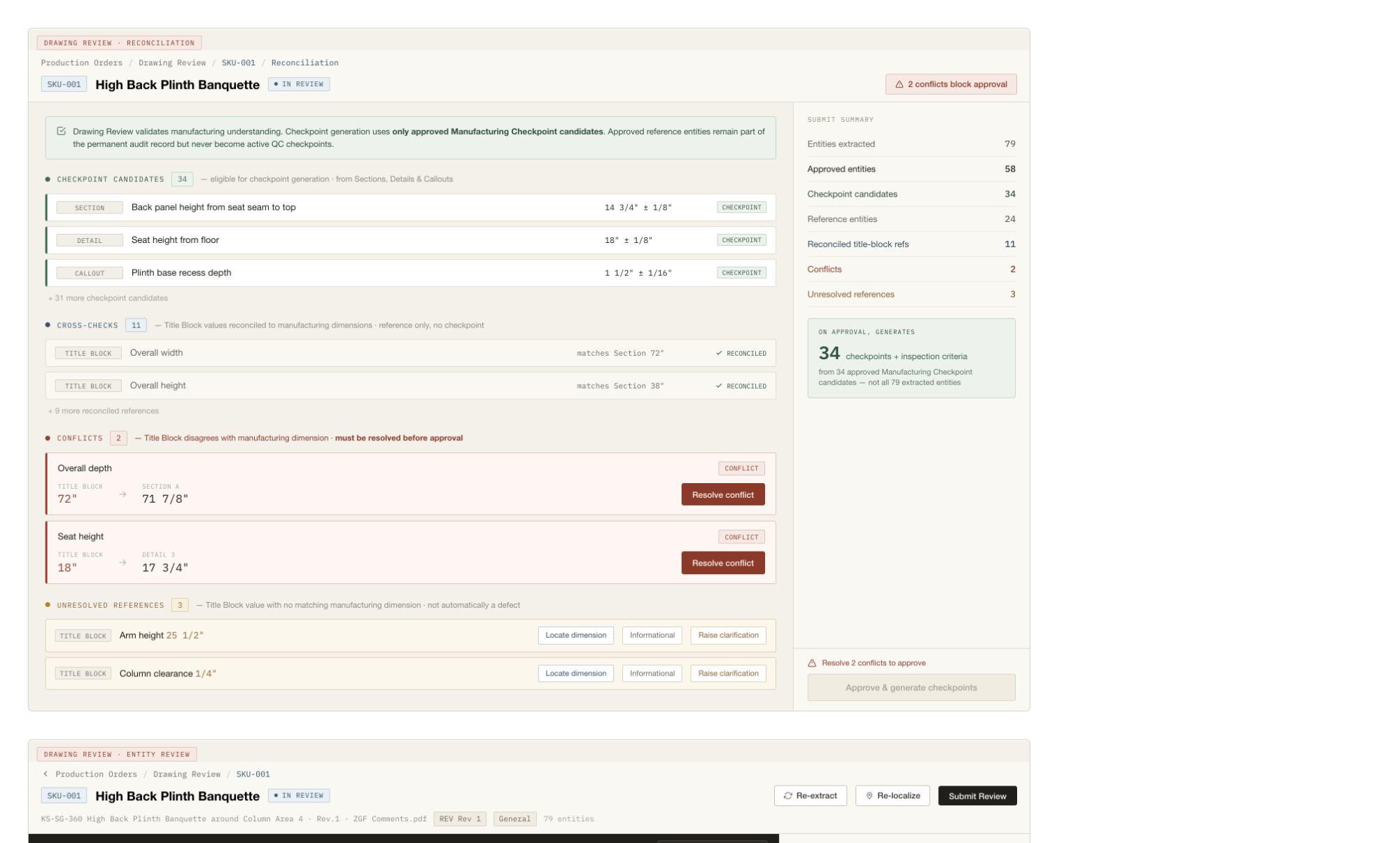
ENFORCESMANAGER
Every pin comes from a real token — never invented.
Pinned to real tokens
Every box is the union of tokens read off the sheet — never invented.
DWG · PDF · scan
One pipeline across CAD, text-layer PDF and OCR scans.
Conflicts block approval
Unresolved discrepancies hold the SKU at step one.
…/007/drawing-review
BDHQ Drawing Review
CHAIN · STEP 02
06

Product Definition

Define the product and assign its materials — this is what generates the checklist.
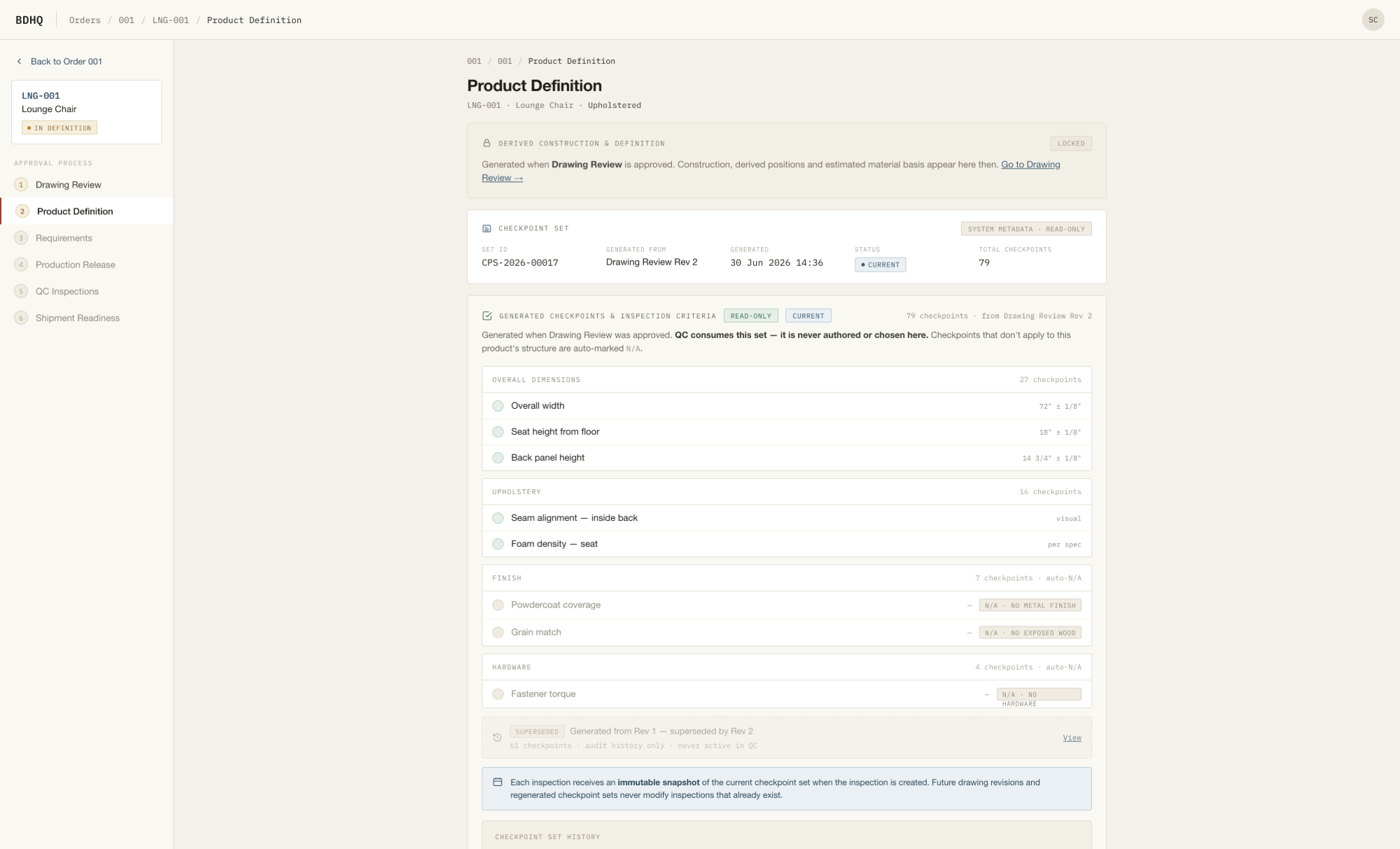
ENFORCESMANAGER
Product structure generates the inspection checklist.
COM assignment
Library fabrics assigned to SKU positions, shown as a material card.
Structure drives the checklist
The checklist is governance-generated — never hand-authored.
Decides what applies
Upholstery, finish and hardware checkpoints follow structure.
…/007/product-definition
BDHQ Product Definition
CHAIN · STEP 03
07

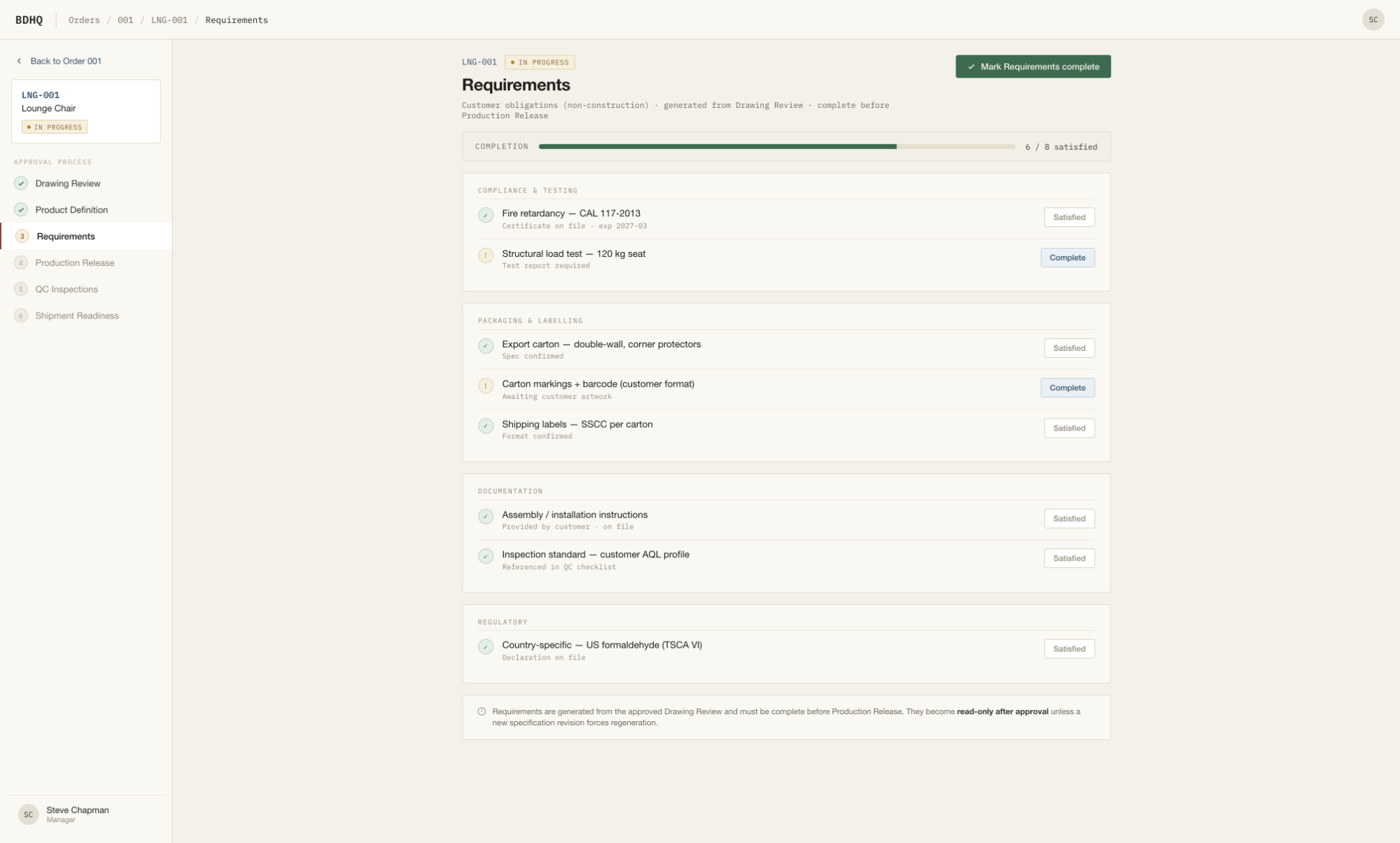
Requirements

The customer's conditions for this SKU — reviewed, then approved.
ENFORCESMANAGER
Requirement sign-off is a release prerequisite.
Explicit conditions
Packaging, labelling and customer-specific asks, tracked.
Approved to advance
Sign-off here is one of the release prerequisites.
Last stop before the gate
With this done, the SKU is ready for Production Release.
…/007/requirements
BDHQ Requirements
CHAIN · THE GATE ◆
08

Production Release

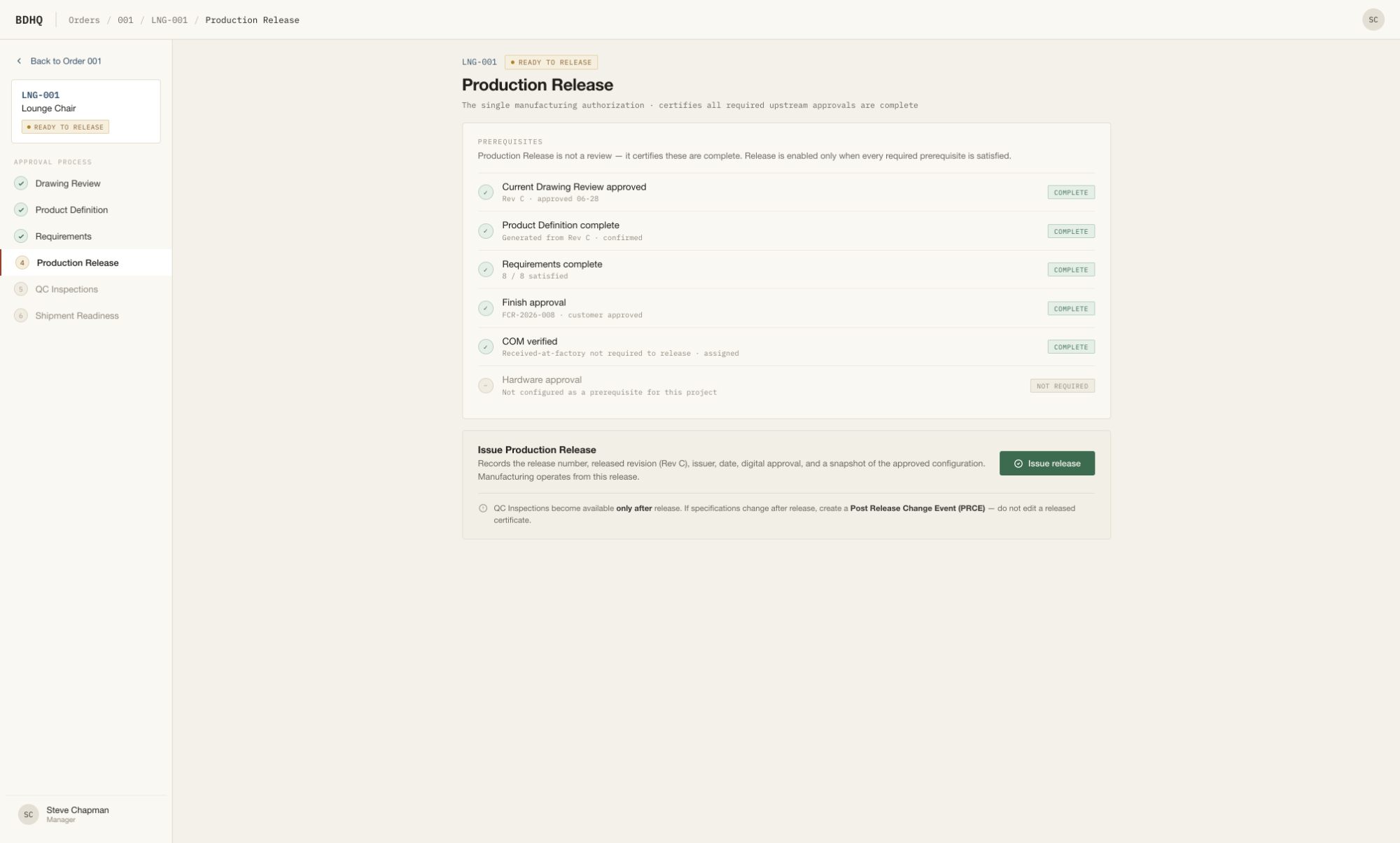
The single certification. One action that unlocks everything downstream.
ENFORCESMANAGER
Refused by the server until prerequisites are met.
Prerequisites, made explicit
The gate lists exactly what's required — and what isn't.
Server-enforced
Not a checkbox — the release is refused until prereqs are met.
The single source downstream
QC and shipment consume only the current release.
…/007/production-release
BDHQ Production Release
02

Inspection

Schedule it, conduct it against the generated checklist, review and seal the report, disposition any defects — then let shipment readiness derive itself.

BoardConductReviewReportNCRShipment Readiness
INSPECTION · CHAIN STEP 04
09

Inspections Board

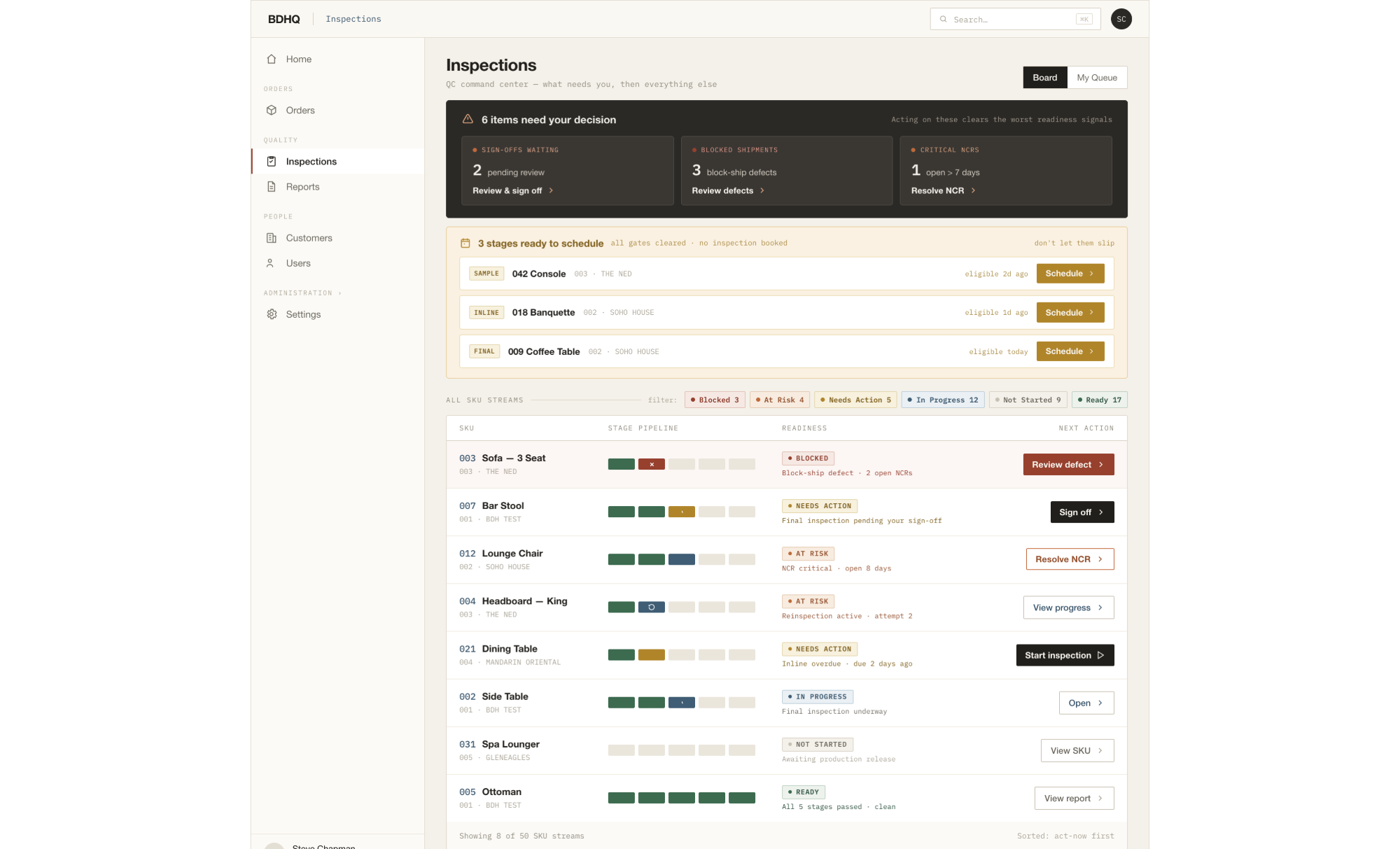
The coordinator's door — planning who inspects what, and when.
ENFORCESCOORDINATOR
Only SKUs past every gate can be scheduled.
Eligible vs locked
Only SKUs that pass every gate can be scheduled.
Reasons on the locks
A locked SKU always names the gate it's waiting on.
Board & My Queue
One nav, two doors — manager plans, inspector executes.
bdhq.app/inspections
BDHQ Inspections Board
INSPECTION · IN PROGRESS
10

Conduct

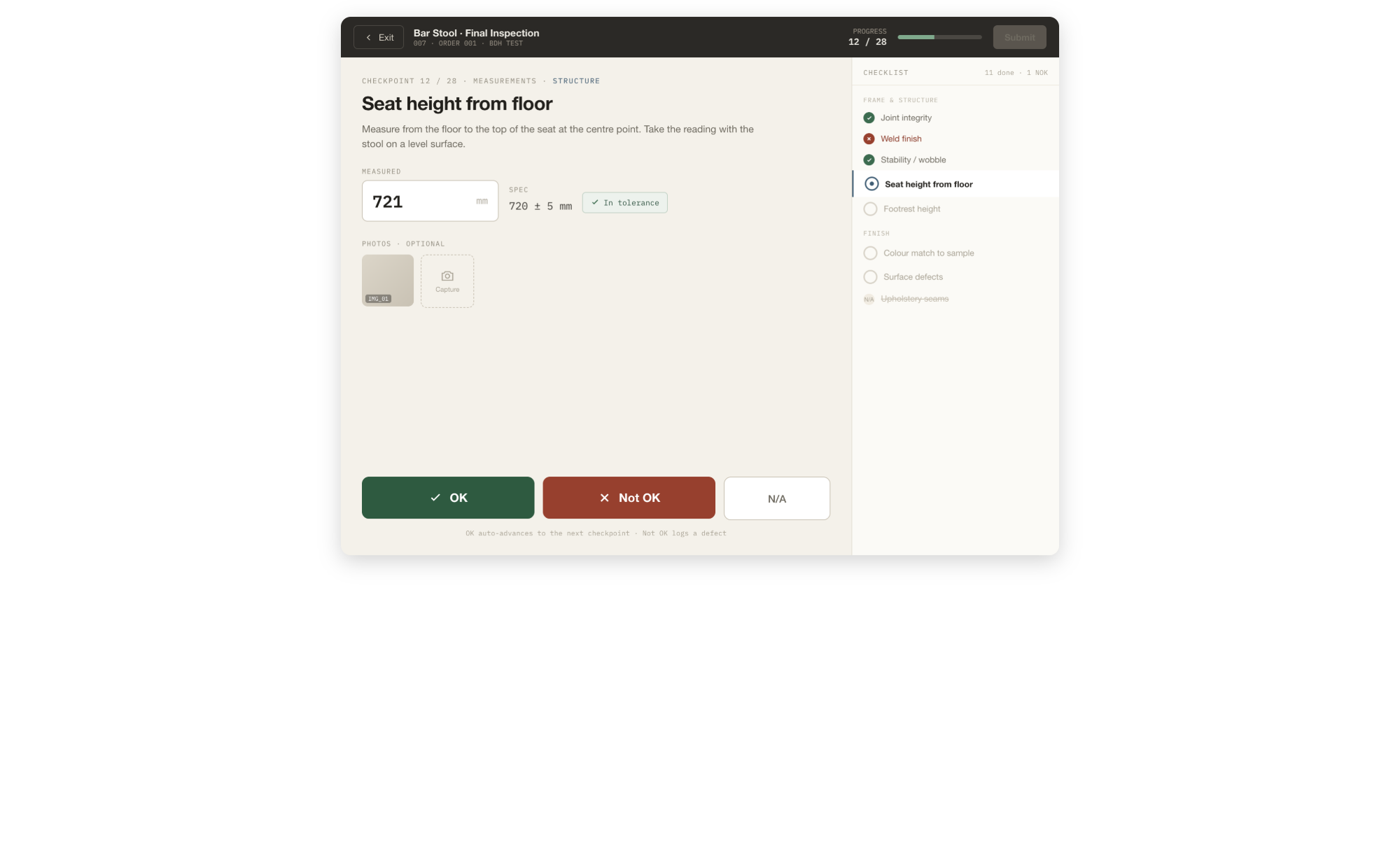
Recording results against the generated checklist — checkpoint by checkpoint.
ENFORCESINSPECTOR
Results only — the checklist itself is fixed.
Results, not authoring
The checklist is fixed; the inspector records outcomes.
Measured to tolerance
Values checked against spec; out-of-tolerance opens a defect.
Auto-N/A by structure
Checkpoints that don't apply resolve themselves.
…/INS-0442/conduct
BDHQ Inspection Conduct
INSPECTION · PENDING REVIEW
11

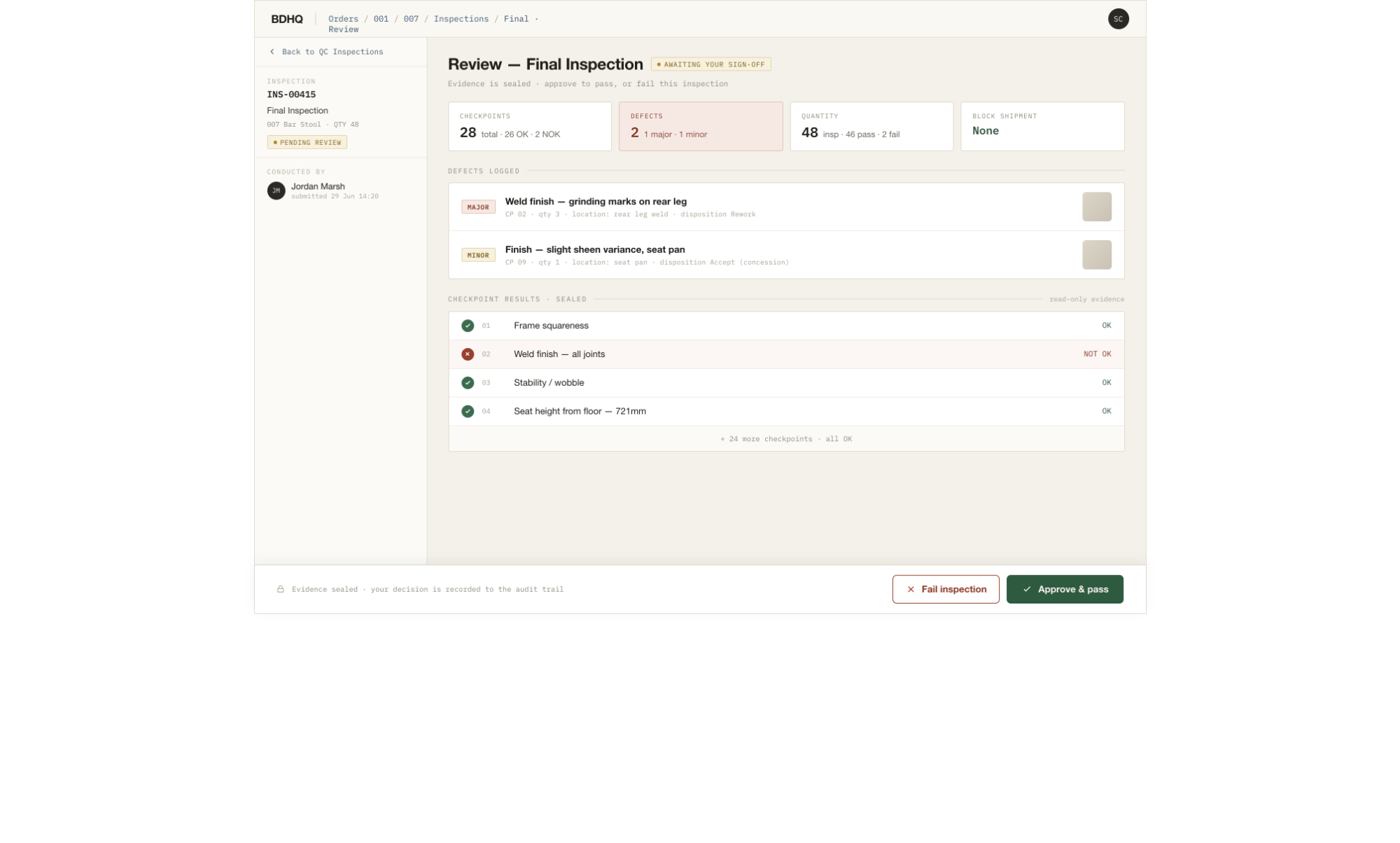
Review & sign-off

A second set of eyes turns a conducted inspection into a sealed record.
ENFORCESMANAGER
Sign-off is what seals the evidence.
Manager review
Results, measurements and photos, reviewed in one place.
Sign-off seals it
Once signed, the evidence becomes immutable.
Failure blocks shipment
A blocking defect propagates everywhere it matters.
…/INS-0442/review
BDHQ Inspection Review
INSPECTION · SEALED
12

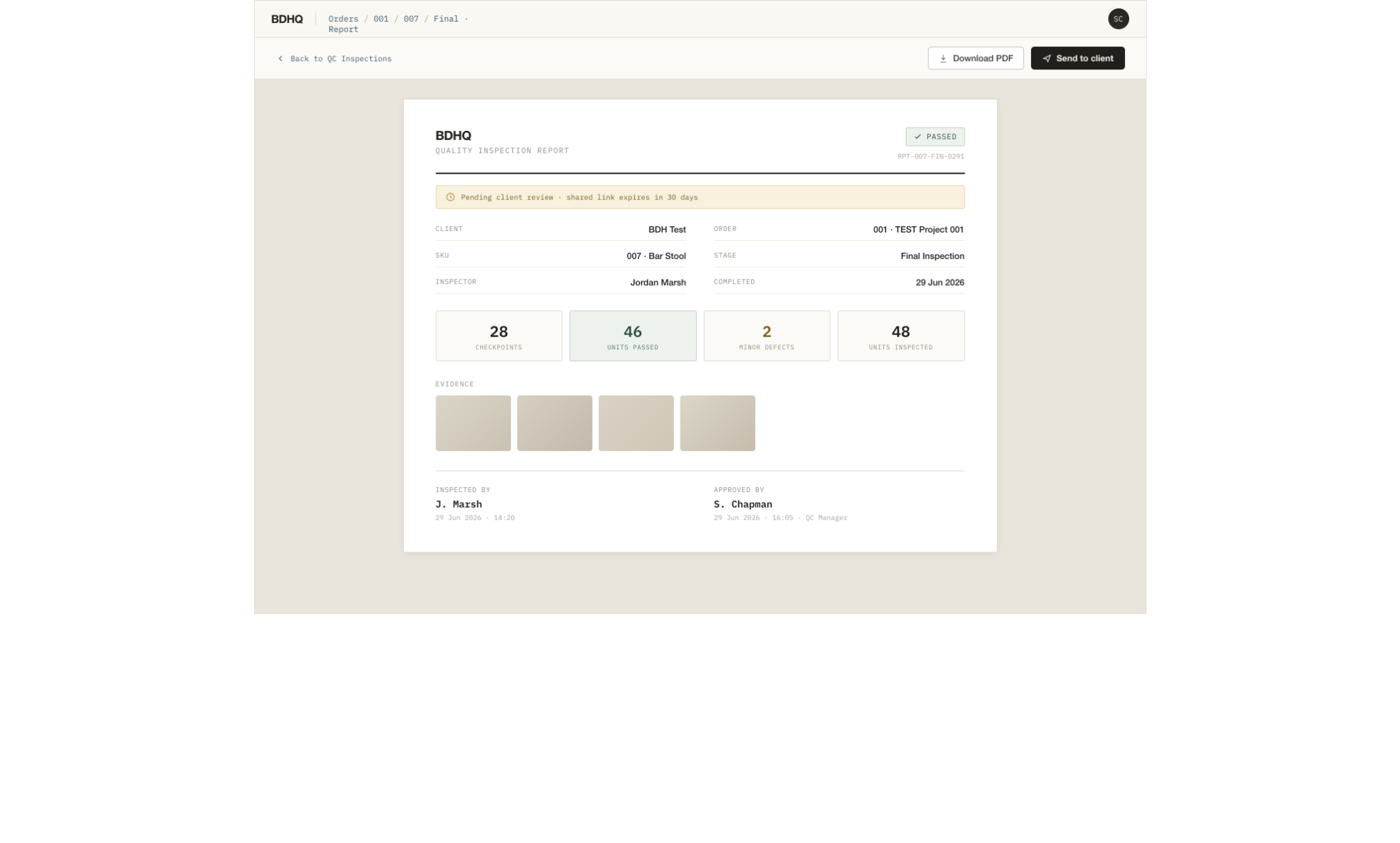
Inspection Report

The permanent record — a sealed snapshot that clients can read too.
ENFORCESMANAGER · CLIENT
The record is immutable after sign-off.
Immutable evidence
Frozen at sign-off — no one edits history.
Reinspection supersedes
A new attempt dims the old — a parent/child chain.
Shared, not exported
The same sealed report the client sees in their portal.
bdhq.app/reports/INS-0442
BDHQ Inspection Report
INSPECTION · NON-CONFORMANCE
13

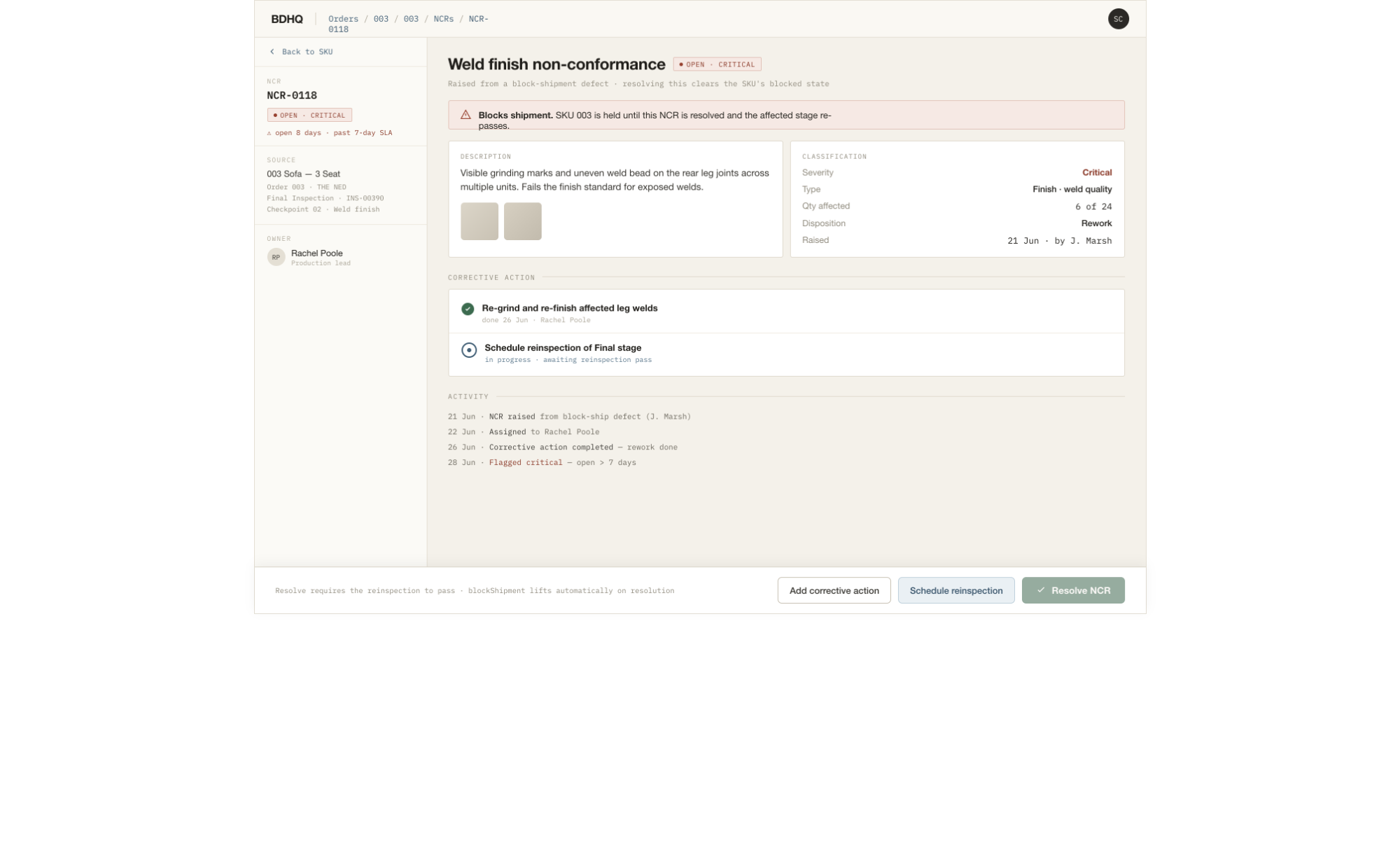
NCR disposition

When something fails, it becomes a tracked non-conformance to resolve.
ENFORCESMANAGER
A blocking NCR holds shipment until dispositioned.
Raised from a defect
A failed checkpoint becomes an NCR with full context.
Blocks until dispositioned
A blocking NCR holds shipment for the SKU.
Can span SKUs
One defect may implicate several line items at once.
bdhq.app/ncrs/NCR-0119
BDHQ NCR detail
INSPECTION · CHAIN STEP 05
14

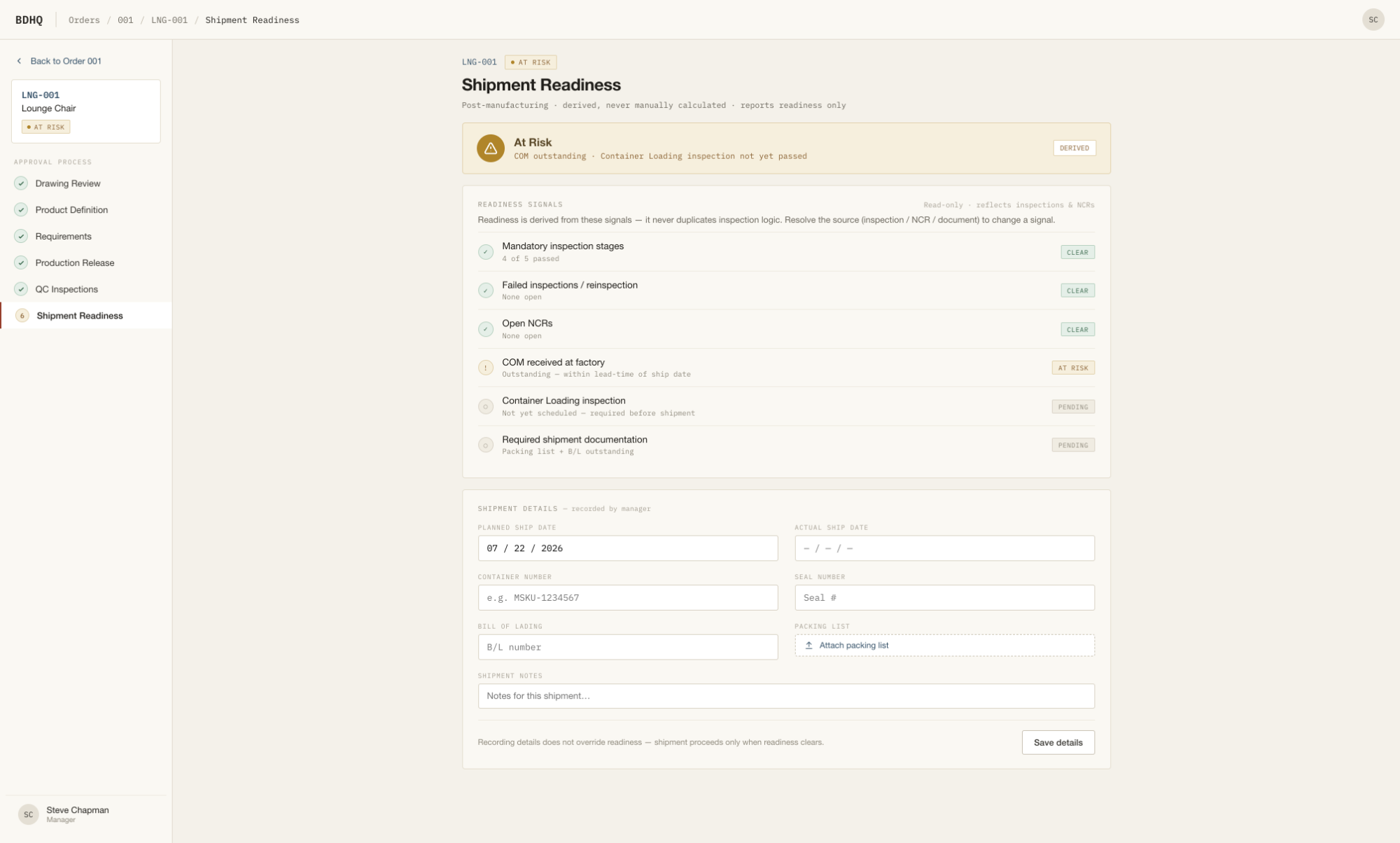
Shipment Readiness

The finish line — and a status the system computes, never one you set.
ENFORCESSYSTEM
Derived from real state — never a stored status.
Fully derived
Ten levels collapse into six clear buckets, Blocked to Ready.
COM & NCRs pull At-Risk
Late materials and open defects surface as risk, not blocks.
Blocks are honest
A blocking defect keeps a SKU out of Ready, full stop.
…/007/shipment-readiness
BDHQ Shipment Readiness
03

Supporting & reporting

The sample-approval loops that run beside the chain, and the cross-order library where every sealed report lives.

Finish ControlHardwareCOMReports Library
SUPPORTING DOMAIN
15

Finish & Hardware

Sample loops that run beside the chain — gating only where they must.
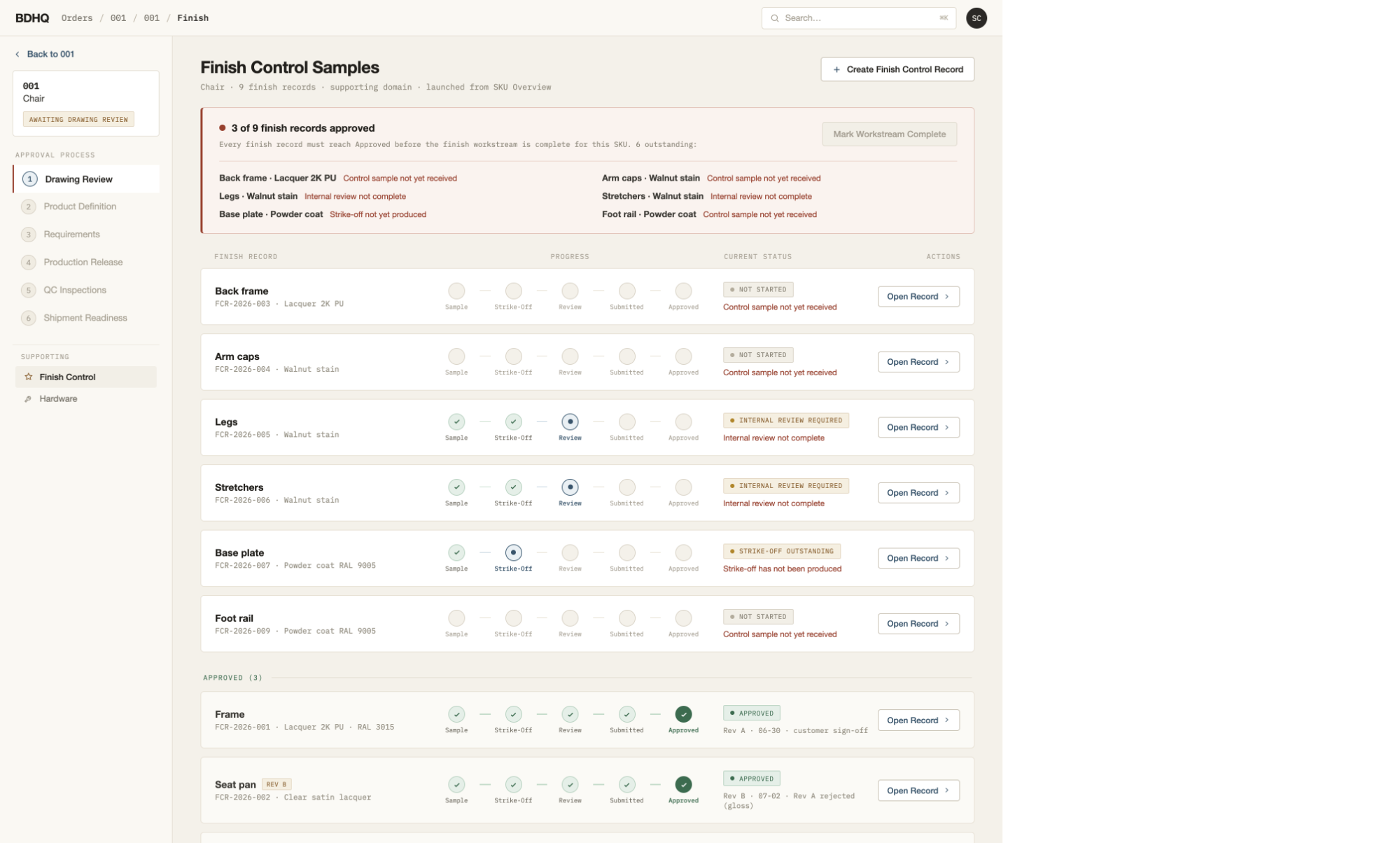
ENFORCESFINISH TEAM
Gates Production Release only where required.
Five-stage sample loop
Receive → strike-off → review → submit → customer decision.
Sealed Rev B loop
Revisions are photo-required and sealed like inspections.
Gates only where real
Finish gates release if required; hardware stays independent.
…/007/finish
BDHQ Finish Control
REPORTING
16

Reports Library

One place for every sealed report — across all orders and SKUs.
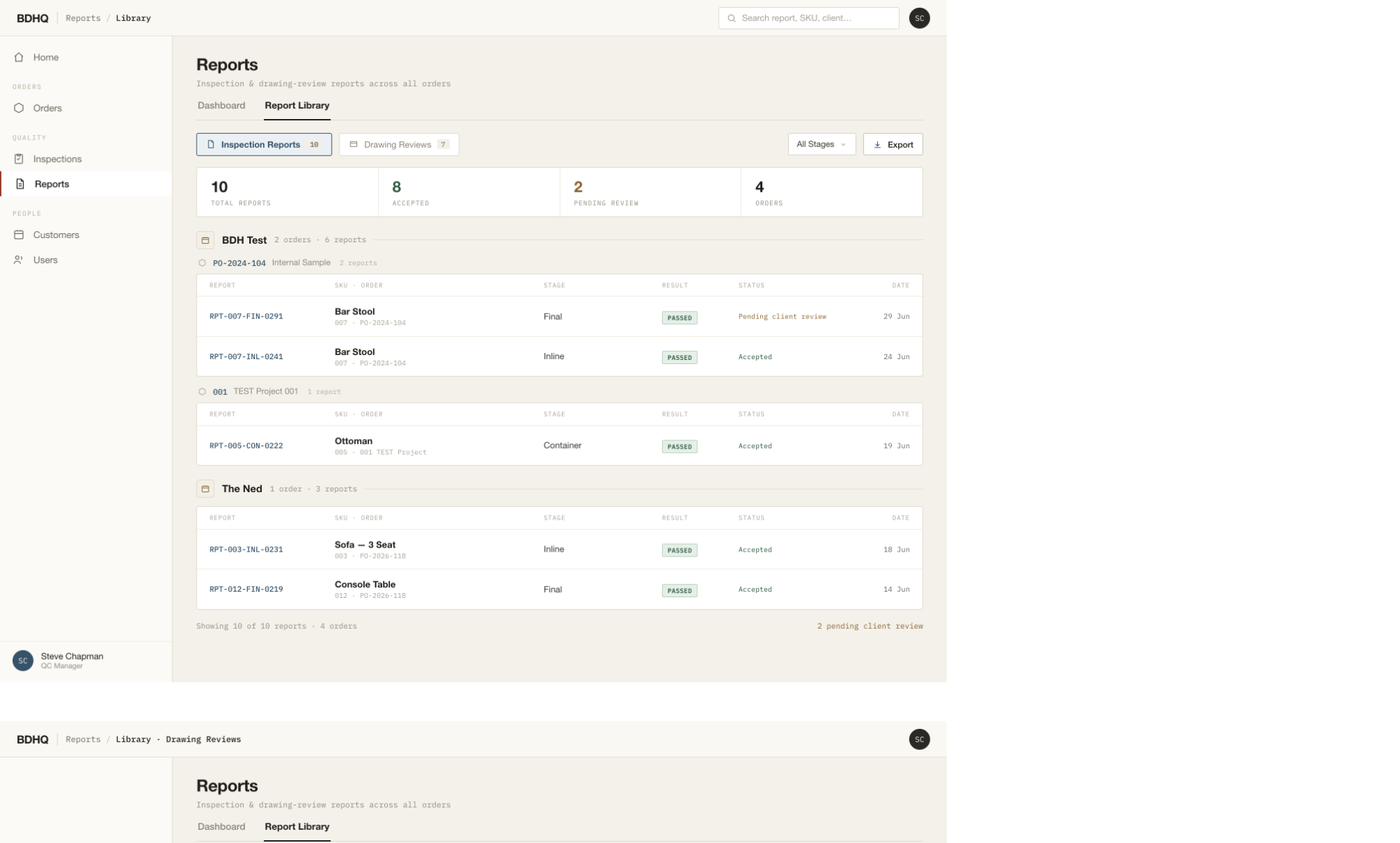
ENFORCESMANAGER · CLIENT
Both doors open the one sealed source.
Cross-order
Every inspection report in the system, searchable.
Same report, two doors
The SKU's Reports tab is this data, scoped down.
Always the sealed source
Both routes open the one immutable record.
bdhq.app/reports
BDHQ Reports Library
04

On the floor

The inspector's native tablet app — Vietnamese by default, offline-first — where inspections actually get done.

ON THE FLOOR · INSPECTOR TABLET

The inspector app, at a glance

VI default · English on tap
offline-first · sealed on submit
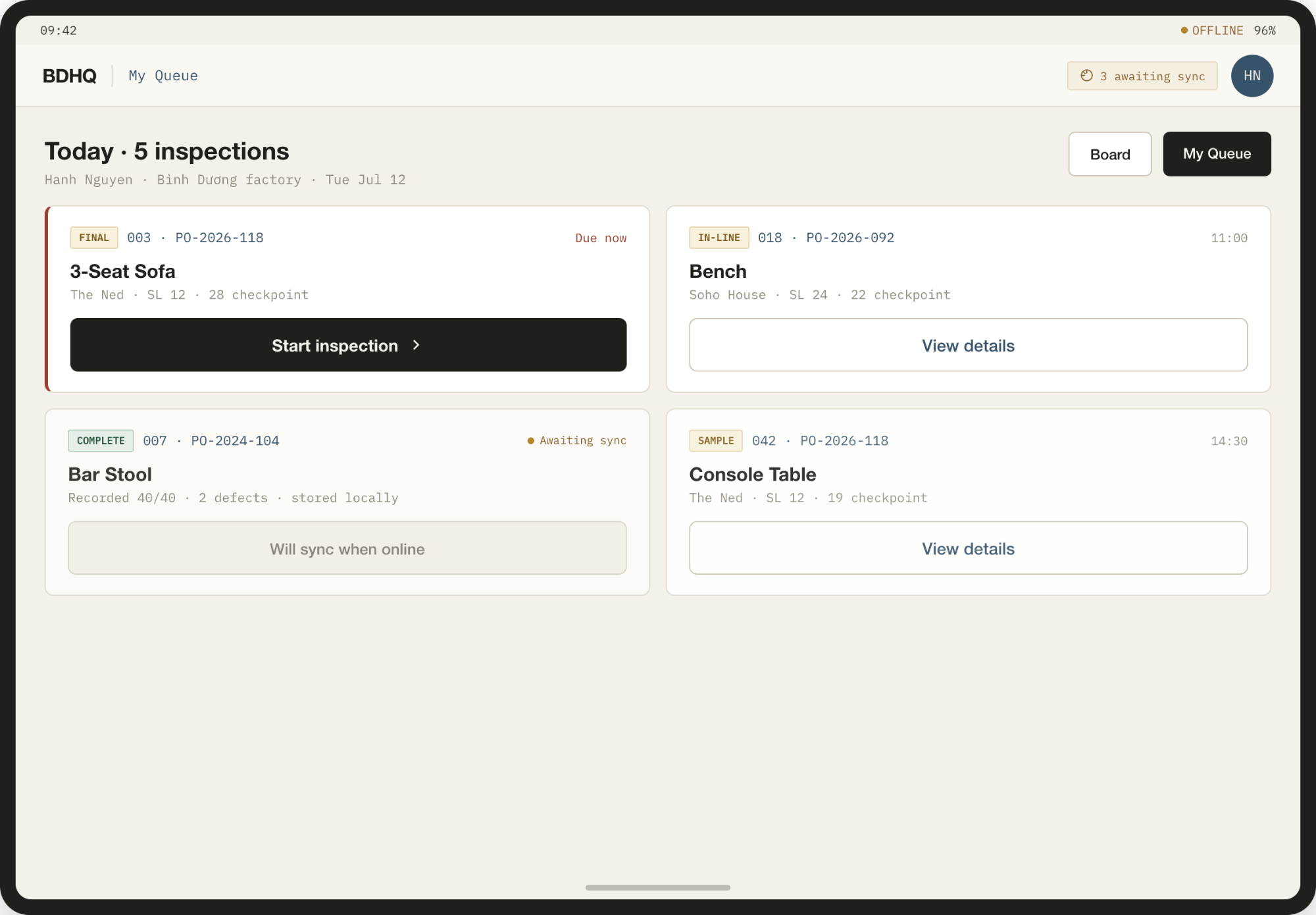
My Queue
01My Queue
The day's assigned inspections, with what's due now and what's synced.
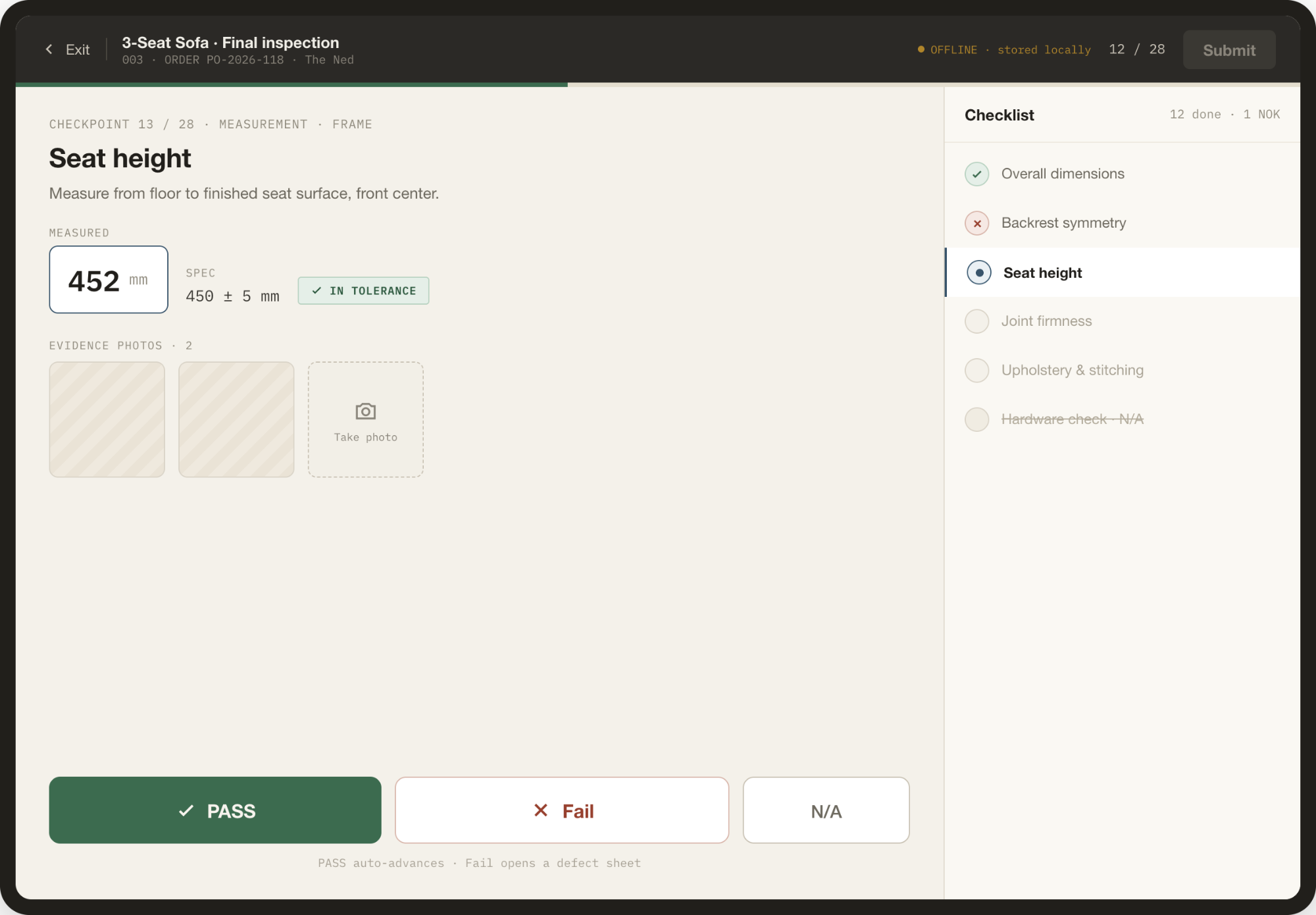
Conduct
02Conduct
A checkpoint with a measured value, tolerance and pass / N-A actions.
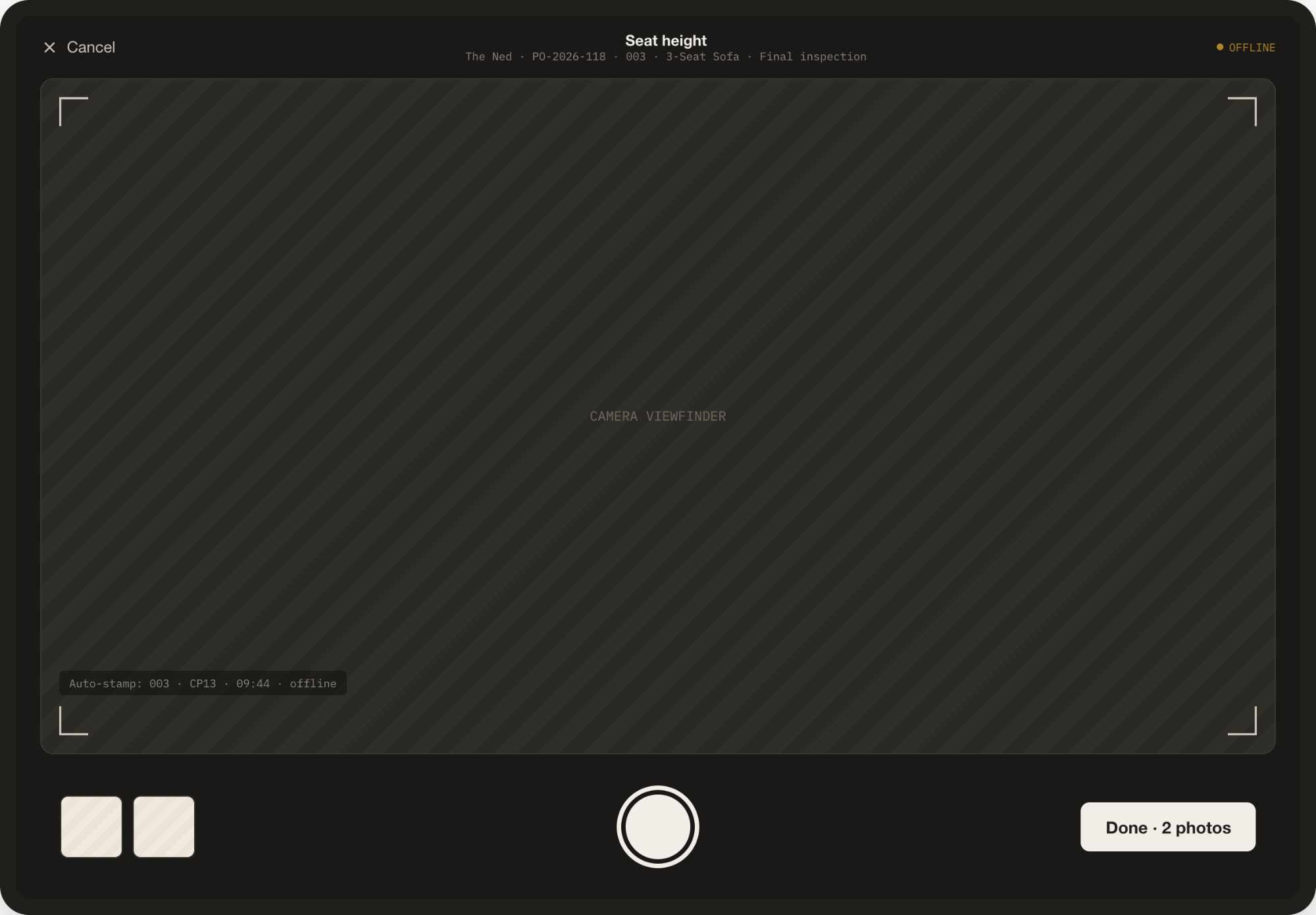
Photo evidence
03Photo evidence
Camera capture attached to the checkpoint, stored offline until sync.
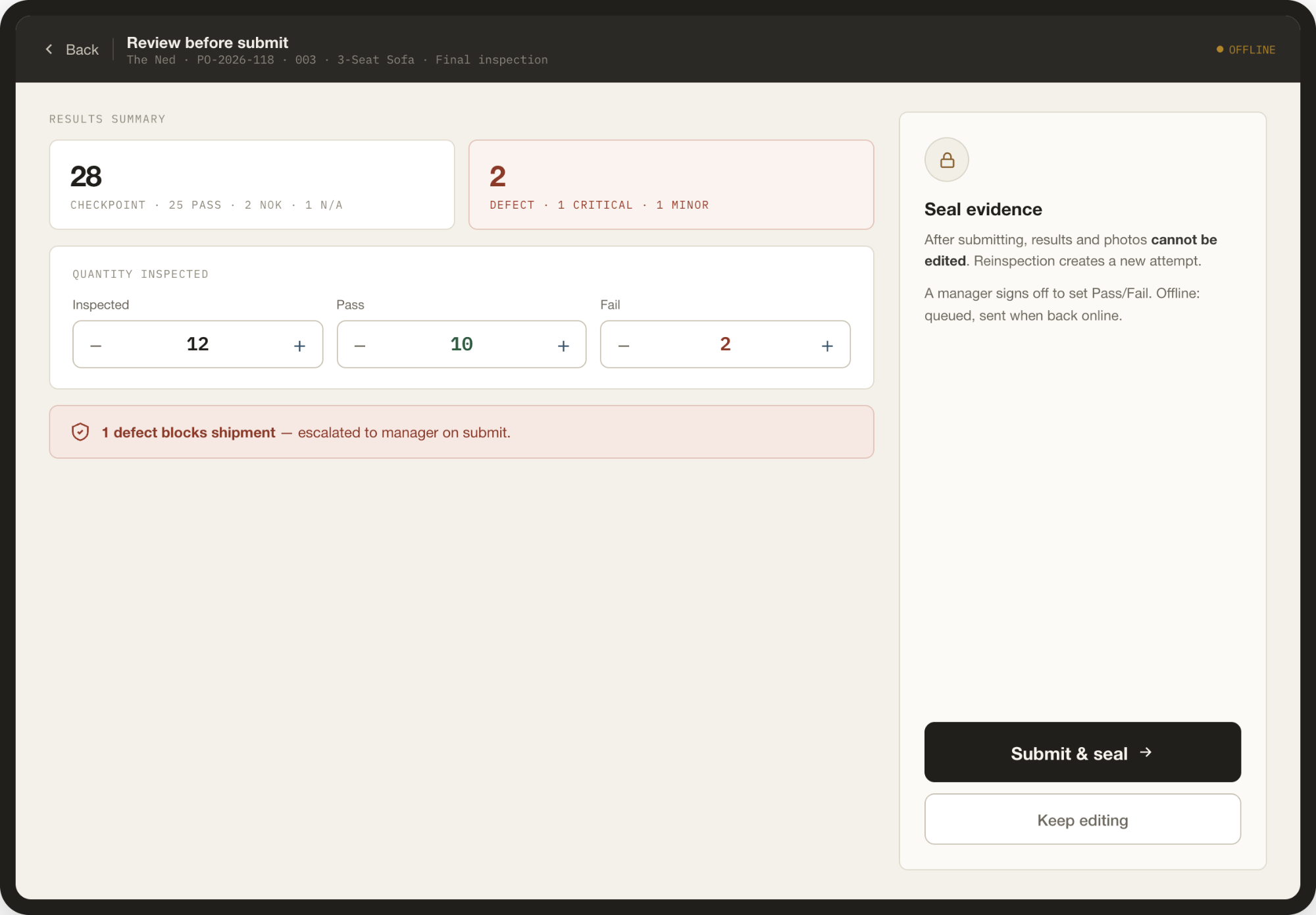
Review and seal
04Review & seal
An all-or-nothing submit that seals the evidence in one transaction.
BDHQ IN CLOSING
END OF TOUR
THE THROUGH-LINE

One SKU. One enforced chain.
One certification to ship.

WHERE IT STANDS
LOCKED
Governance & navigation model
BUILT · VERIFIED
Desktop portal, all roles
BUILT · BILINGUAL
Tablet apps & drawing engine
IN BUILD
Native Android, from these mockups
BDH Furniture · SKU-centric QC & production governance press R to restart